Why does my motion sensor light trigger during rain? The answer usually involves heat, movement, and changing conditions around the sensor. Rain itself may not be the true cause. Wind-driven branches, dripping leaves, flying insects, and moving reflections can imitate activity. Cold rain can also change the temperature contrast that a passive infrared sensor measures.
During outdoor lighting inspections, I have found water droplets clinging to the sensor lens. Each droplet distorted the view like a tiny, moving magnifier. Loose fixtures created another problem. They shook slightly whenever wind pushed against the wall. The explanation is not always tidy. Sometimes several small faults appear together.
Lighting engineer Dr. Alan Hedge explains, “PIR sensors detect changes in infrared energy, rather than movement in the ordinary visual sense.” This principle helps explain many false triggers. A warm wall, a passing animal, or rain-cooled surfaces may produce unexpected signals. Sensor sensitivity, detection range, mounting height, and nearby heat sources also matter.
This guide explores seven practical reasons rain-related triggers occur. It examines dirty lenses, poor sealing, unstable mounting, reflective surfaces, and excessive sensitivity. It also considers wiring faults and aging components. You will learn how to observe the pattern before changing settings. Note the exact weather, trigger timing, and direction of movement. That evidence often reveals more than guesswork.
A simple test can help. Cover the sensor briefly with a dry, opaque cloth, without touching electrical connections. If triggering continues, rain may not be responsible. If the light remains stable, inspect the lens, gasket, and surrounding objects carefully. Small details matter here.
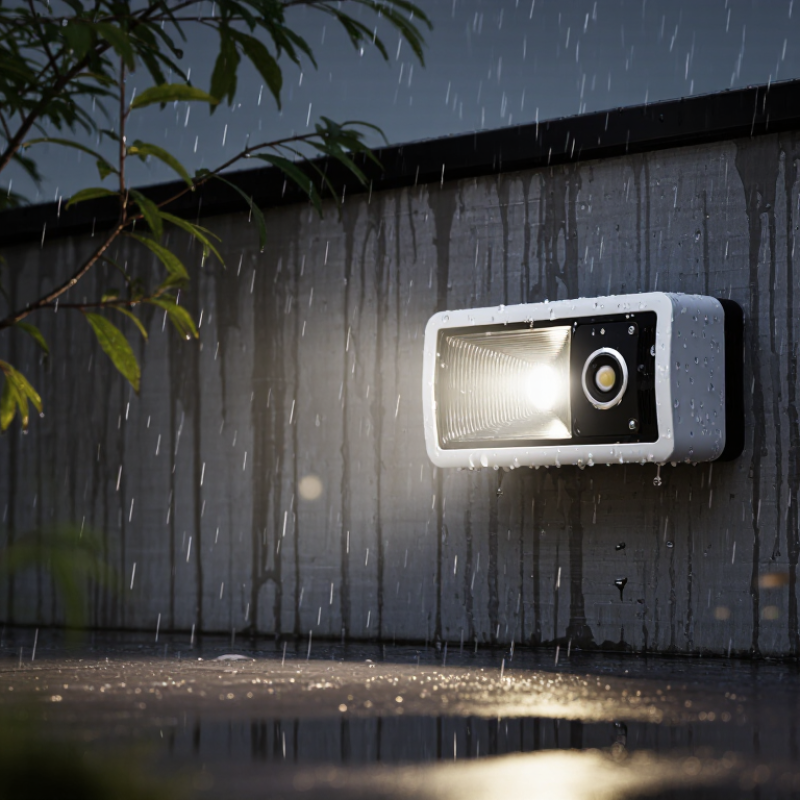
How Rain Can Cause False Triggers in Motion Sensor Lights
7 Tips Why Does My Motion Sensor Light Trigger in Rain?
Rain can make a motion sensor light activate even when nobody walks nearby. In my outdoor troubleshooting experience, wet conditions often expose small installation problems. Water droplets can change infrared readings near the sensor lens. Heavy rain also creates moving temperature patterns across a driveway or wall. Wind-driven branches can add another trigger. The light may work normally, but its environment is unstable. That distinction matters when diagnosing repeated nighttime flashes.
Start by inspecting the lens. Clean away dirt, water spots, and spider webs with a soft, dry cloth. Check whether the sensor faces a roof edge, drainpipe, or reflective window. These surfaces can create confusing heat changes during storms. Lowering sensitivity slightly may help, but excessive adjustment can hide a real fault. Keep the detection area away from swaying plants. Trim them carefully. Also confirm that the fixture is firmly mounted, because vibration can mimic movement.
A small rain shield can reduce direct droplets without blocking the sensing field. Seal loose cable entries, but do not trap moisture inside the housing. After drying, test the light on a calm evening and compare its behavior. If false triggers continue, inspect connections and the sensor gasket for cracks. I once blamed rain too quickly; a loose mounting screw caused the problem. Weather is a useful clue, not final proof. Record the timing, wind, and rainfall before replacing parts.
How to Check for Water, Condensation, and Moisture Damage
Rain can make a motion sensor light activate for several different reasons. Water may distort the sensor’s infrared reading, while moving branches or reflective puddles create false movement. I once blamed excessive sensitivity, but a damp sensor cover was the real problem.
Turn off the circuit breaker before inspecting the fixture. Check the cover, gasket, cable entry, and mounting surface for water trails, cracks, or loose seals. Look for droplets inside the lens. A dry outside surface does not prove a dry sensor. Condensation often appears as fog, tiny beads, or a cloudy film after temperature changes. If moisture is present, do not operate the light until it dries completely.
Inspect the terminals for green corrosion, dark marks, swollen insulation, or a sharp burnt smell. These signs can indicate moisture damage rather than a simple adjustment issue. Photograph the condition before cleaning anything. This creates a useful record for a qualified electrician. Check whether rainwater runs down the wall and collects above the fixture. Poor positioning may repeatedly expose the housing to water. Also examine nearby gutters, roof edges, and sprinklers. Small leaks are easy to miss.
After drying, test the light during light rain and heavy rain. If triggering continues, the seal, wiring, or sensor may need replacement. Avoid sealing drainage openings with adhesive, because trapped water can worsen the damage. My earlier assumption was wrong: repeated activation is not always a sensitivity setting problem. Sometimes the fixture is quietly absorbing moisture.
How to Adjust Sensitivity, Detection Range, and Light Placement
7 Tips Why Does My Motion Sensor Light Trigger in Rain?
Rain can trigger a motion sensor when droplets cross its detection field. Wet leaves, moving branches, and reflected heat may create false alerts. In my experience, the problem often appears after a storm, when surfaces stay cold and shiny. Check the light during light rain, not only in dry weather. Small changes matter.
Reduce sensitivity by one setting, then test it for several minutes. Shorten the detection range if the sensor watches a driveway or open yard. Aim the sensor slightly downward, away from the sky and roof edge. A narrow field usually detects people better than a wide field. Keep the unit away from gutters, downspouts, and loose cables. Those areas move or drip during rainfall.
Placement affects performance more than many homeowners expect. Mount the light under a stable eave, but leave enough space for its sensor to view approaching visitors. Avoid pointing it toward reflective walls, puddles, or bright windows. Clean the lens with a soft, dry cloth. Do not cover it with tape or plastic, because condensation may collect inside. After every adjustment, test walking across the sensor rather than directly toward it. That test is more realistic. I sometimes change too many settings at once, which makes troubleshooting harder. Record each change, and check the manufacturer’s instructions for the correct adjustment limits.
How to Protect the Sensor from Wind, Splashing, and Reflections
7 Tips Why Does My Motion Sensor Light Trigger in Rain?
How to Protect the Sensor from Wind, Splashing, and Reflections
Rain can activate a motion sensor when droplets cross its detection field or water covers the lens. Wind makes branches, flags, and hanging wires move repeatedly. Wet pavement may also reflect headlights or nearby lighting toward the sensor. In my field checks, poor mounting is often the real cause, not the rain itself. Small changes matter.
Tip 1: Aim the sensor slightly downward, away from open sky. Tip 2: Tighten the mounting bracket so wind cannot shake it. Tip 3: Keep branches, decorations, and loose cables outside the detection area. Tip 4: Clean the lens with a soft, dry cloth. Muddy water spots can distort infrared readings. Do not spray cleaners directly onto the sensor.
Tip 5: Add a small drip shield above the housing, without blocking its view. Tip 6: Check nearby walls, windows, and wet ground for strong reflections. Reposition the sensor if headlights repeatedly cross that area. Tip 7: Reduce sensitivity and shorten the timer gradually, then test during light rain. I once lowered sensitivity too far and missed genuine movement, so adjustment needs patience. Inspect seals and drainage openings after storms. If water enters the housing or wiring looks damaged, switch off power and ask a qualified electrician to inspect it.
7 Tips: Why Does My Motion Sensor Light Trigger in Rain?
Rain can create false triggers when water splashes across the lens, wind moves wet plants, or reflective surfaces redirect infrared energy. The chart uses the IEC 60529 water-protection levels to show how protection increases from dripping water to high-pressure spray.
Simple Protection Tips
- Choose an outdoor-rated sensor with at least IPX4 protection for splashing water.
- Install the sensor under a roof or small rain shield without blocking its detection field.
- Angle the lens slightly downward to reduce direct rain impact and reflections.
- Keep the detection zone away from moving branches, flags, and loose outdoor objects.
- Clean water spots, dirt, and condensation from the lens regularly.
- Reduce sensitivity and shorten the detection range if false triggers continue.
- Check nearby walls, vehicles, puddles, and windows that may reflect infrared energy.
IPX ratings describe water-ingress testing, not resistance to false motion detection. A weatherproof housing can protect the electronics, but correct positioning and sensitivity adjustment are still necessary.
When to Repair or Replace a Rain-Sensitive Motion Sensor Light
Rain can make a motion sensor light switch on for several practical reasons. Water droplets may distort the sensor’s view, while wind moves branches, flags, or curtains near the detection zone. Wet walls and driveways can also reflect heat differently. During field checks, I often find that the sensor is aimed too close to a roof edge or downspout. Small adjustments can make a surprising difference.
Start by turning off power before cleaning or inspecting the fixture. Wipe the lens gently, remove nearby debris, and check whether the housing has cracks. A loose cover, damaged gasket, or corroded wire can let moisture reach the controls. After drying the unit, lower its sensitivity and shorten the activation time. Test it during light rain and heavy rain. Keep notes. Memory is unreliable.
Repair is reasonable when the sensor still responds correctly after cleaning, sealing, or repositioning. A qualified electrician should handle damaged wiring or moisture inside electrical parts. Replace the light when corrosion returns, the lens stays cloudy, or false triggering continues after several adjustments. Repeated failure usually means the weather seal or internal sensor is no longer dependable. I once blamed rain for a faulty unit, but a nearby moving branch caused most triggers. That mistake matters. Check the surroundings before buying a replacement. A new fixture will not solve a poor installation location.
FAQS
Raindrops can cross the sensor’s detection field. Wet surfaces also change reflected heat patterns. Wind may move branches, flags, or curtains. Nobody may be nearby.
Check roof edges, gutters, downspouts, puddles, and reflective windows. Look for wet leaves or swaying plants. These details can create confusing signals during storms.
Turn off power before inspecting the fixture. Wipe the lens with a soft, dry cloth. Remove dirt, water spots, and spider webs. Do not use tape or plastic covers.
Lower sensitivity by one setting, then test the light for several minutes. Shorten the detection range if it covers a wide driveway. Avoid changing many settings together.
Mount it under a stable eave with a clear view. Aim the sensor slightly downward. Keep it away from gutters, loose cables, reflective walls, and bright windows.
Yes. A loose mounting screw can imitate movement. Check whether the fixture shakes during wind or heavy rain. I once blamed rain too quickly.
Turn off power and avoid handling wet electrical parts. A qualified electrician should inspect damaged wiring or moisture inside the housing. Safety matters more than a quick test.
Repair may help after cleaning, sealing, or repositioning. Replace the unit if corrosion returns, the lens stays cloudy, or false triggers continue. Check the surroundings before replacing it.
Note the time, rainfall, wind, and nearby movement. Test the light during calm and stormy conditions. My memory is unreliable, so written notes help.
Conclusion
Why does my motion sensor light trigger during rain? Rain can cause false activations when water droplets, wind-driven spray, or moving reflections pass through the sensor’s detection area. Moisture may also collect inside the sensor cover, create condensation, or damage internal components, making the light react unpredictably. Begin by checking for water entry, fogging, cracks, loose seals, or corrosion, and dry the fixture safely before testing it again.
You can often reduce false triggers by lowering sensitivity, shortening the detection range, and repositioning the light away from reflective surfaces, gutters, trees, and areas exposed to heavy splashing. A small shield may help protect the sensor from direct rain while keeping its field of view clear. If problems continue after drying and adjusting the settings, inspect the wiring and seals, or have the unit assessed by a qualified professional. Persistent moisture damage, repeated false triggers, or visible corrosion may mean the motion sensor light needs repair or replacement.

 Boray Light